Portable RIAs – Flex Apps in PDFs
Update: I’ve posted another Portable RIA demo.
The web began as a platform for browsing, finding, and exchanging documents. Over the past ten years the web has moved beyond this document-centric role, and is now a platform for exchanging data. We typically refer to web sites used for data exchange as web applications. The next major evolution of the web is underway as web applications become more interactive and useful. The industry now refers to these next generation web applications as rich Internet applications or RIAs.
Another popular means of document exchange is the Portable Document Format (PDF). Like the web, PDFs are also evolving into more than just a document exchange technology. When RIAs are inserted into PDFs, this familiar format for documents becomes a method for exchanging and interacting with data. The primary benefits of using PDFs for data exchange are that PDFs can easily be secured, emailed around, and accessed when offline.
I’ve put together a demo illustrating this concept. You will need Reader 9 in order for this to work. First load the Flex Dashboard application application in your browser. Then in the application click the “Create PDF” button. Now you should be looking at the same data inside of a PDF! You can even save the PDF locally and view it when disconnected. You can also refresh the data from the server from the PDF or from the browser.
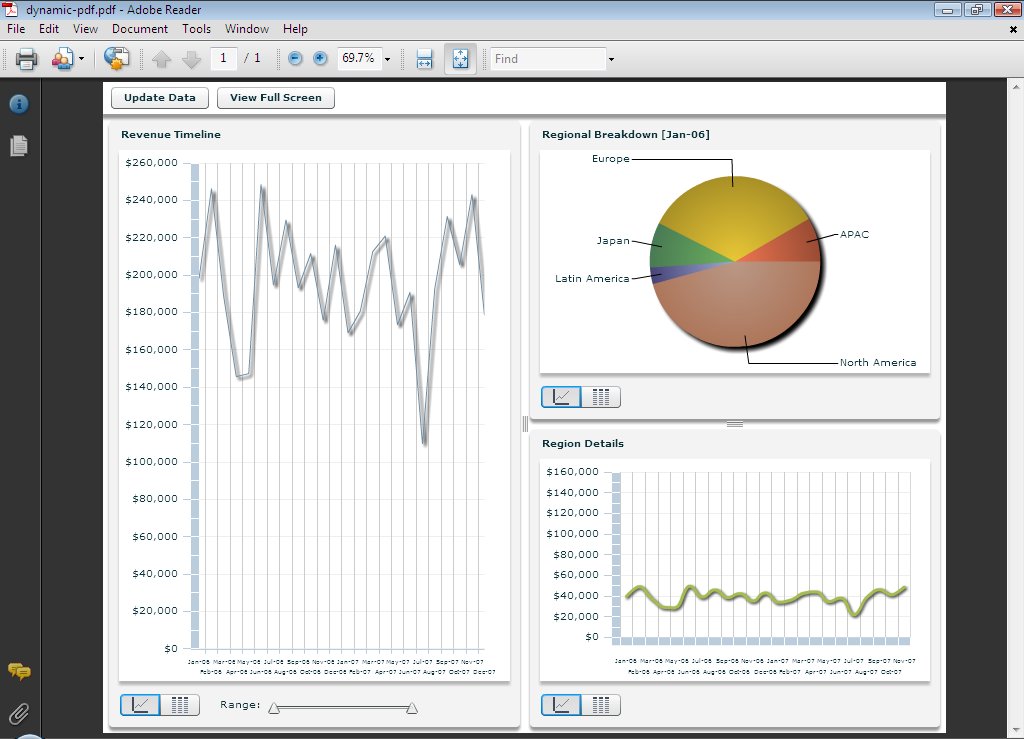
This works by using a template PDF containing the Flex application without any data. When the user asks for a PDF the data is inserted into the PDF template and delivered to the user. Optionally the PDF could be secured with PDF policy protection before being sent to the user. You can also create these PDFs in a nightly batch process.
Getting Started
You need several pieces to build a portable RIA. First, you need a Flex application that the user will interact with in their browser and inside a PDF. Second, you need some place for the Flex application to get its data. Third, you need a PDF template and a server that can insert the application data into it when the user requests a PDF. I used the following steps to build these pieces:
- Create the back-end data source for the application
- Create the basic Flex front-end application
- Create a back-end PDF generation service
- Create a PDF with form fields that will be used to store the data
- Modify the Flex application to read data from the PDF
- Add a way for the user to generate a PDF from the Flex application
- Merge the final Flex application into the PDF template
To complete this tutorial you’ll need a Java web app server (Tomcat, JBoss, WebLogic, WebSphere, or similar), LiveCycle Data Services 2.6, Flex Builder 3 (installed as a plugin for Eclipse), Acrobat 9 to create the PDF, and optionally Adobe LiveCycle Designer 8.2.
Let’s walk through each of these seven steps in detail.
Download the source code for tutorial.
Step 1: Creating the back-end data source
The application needs some data so I created a JSP that generates some fake and random sales data. This data is returned from the server in XML format. One challenge in building this was that Reader needs a “*” crossdomain.xml policy file on the server that offers the data. Having a “*” policy can be a security risk, especially when the data is on an internal server or on a server which uses cookies for authentication. In my production demo I didn’t want to put a “*” policy file on my demo server so I serve the data from a different server. Because of this I ended up using PHP for my public demo. However, for the purposes of this tutorial I will just use a simple JSP file. Here is the file, data.jsp:
<% response.setContentType("text/xml"); %>
<?xml version="1.0" encoding="utf-8"?>
<list>
<%
String[] months = {"Jan", "Feb", "Mar", "Apr", "May", "Jun", "Jul", "Aug", "Sep", "Oct", "Nov"};

for (int i = 6; i < 8; i++)
{
  for (int j = 0; j < months.length; j++)
  {
    String month = months[j] + "-0" + i;
    int apacRev = (int)(Math.random() * 60000);
    int europeRev = (int)(Math.random() * 80000);
    int japanRev = (int)(Math.random() * 50000);
    int latinAmRev = (int)(Math.random() * 30000);
    int northAmRev = (int)(Math.random() * 100000);
    int totalRev = apacRev + europeRev + japanRev + latinAmRev + northAmRev;
    int averageRev = totalRev / 6;
%>
    <month name="<%=month%>" revenue="<%=totalRev%>" average="<%=averageRev%>">
        <region name="APAC" revenue="<%=apacRev%>"/>
        <region name="Europe" revenue="<%=europeRev%>"/>
        <region name="Japan" revenue="<%=japanRev%>"/>
        <region name="Latin America" revenue="<%=latinAmRev%>"/>
        <region name="North America" revenue="<%=northAmRev%>"/>
    </month>
<%
  }
}
%>
</list>
You will also need to add a crossdomain.xml policy file to your root web containing the following:
<cross-domain-policy>
	<site-control permitted-cross-domain-policies="master-only"/>
	<allow-access-from domain="*"/>
</cross-domain-policy>
Make sure that you do not use this policy file in production, as you should never have a “*” policy on an internal server or on a domain which uses cookies for authentication. For more information on secure cross-domain communication in Flash Player see:
http://www.adobe.com/devnet/flashplayer/articles/secure_swf_apps.html
Step 2: Creating the Flex front-end application
Before I could use the typical sales dashboard in the demo, I first had to create that dashboard in Flex. Luckily this was easy since one of the out-of-the-box LiveCycle Data Services samples has a dashboard. I made a few modifications to the dashboard and then added it to my Flex application. You can test the dashboard by creating a HTTPService and attaching the data to the Dashboard. Here is my application (you will need the Dashboard source code from the LiveCycle Data Services sample application for this to compile):
<?xml version="1.0" encoding="utf-8"?>
<mx:Application xmlns:mx="http://www.adobe.com/2006/mxml" xmlns:local="*"
  applicationComplete="srv.send()">

  <mx:HTTPService id="srv" url="http://localhost:8080/data.jsp"/>

  <local:Dashboard width="100%" height="100%" dataProvider="{srv.lastResult.list.month}"/>

</mx:Application>
Step 3: Creating a back-end PDF generation service
I used LiveCycle Data Services to handle generating the PDF for the user. To set up this service I copied the WEB-INF/flex and WEB-INF/lib directories from the flex.war file included with LiveCycle Data Services to my root web application. I then added some necessary configuration code to my web.xml file:
<?xml version="1.0" encoding="UTF-8"?>

<web-app>
    <display-name>Portable RIAs Demo</display-name>
    <description>Portable RIAs Demo</description>

    <listener>
        <listener-class>flex.messaging.HttpFlexSession</listener-class>
    </listener>

    <servlet>
        <servlet-name>MessageBrokerServlet</servlet-name>
        <display-name>MessageBrokerServlet</display-name>
        <servlet-class>flex.messaging.MessageBrokerServlet</servlet-class>
        <init-param>
            <param-name>services.configuration.file</param-name>
            <param-value>/WEB-INF/flex/services-config.xml</param-value>
        </init-param>
        <load-on-startup>1</load-on-startup>
    </servlet>

    <servlet>
        <servlet-name>PDFResourceServlet</servlet-name>
        <display-name>Helper for retrieving dynamically generated PDF documents.</display-name>
        <servlet-class>com.jamesward.portablerias.PDFResourceServlet</servlet-class>
    </servlet>

    <servlet-mapping>
        <servlet-name>MessageBrokerServlet</servlet-name>
        <url-pattern>/messagebroker/*</url-pattern>
    </servlet-mapping>

    <servlet-mapping>
        <servlet-name>PDFResourceServlet</servlet-name>
        <url-pattern>/dynamic-pdf/*</url-pattern>
    </servlet-mapping>

</web-app>
The PDFResourceServlet is a custom class that returns the generated PDF to the user. I also created a class named PDFService that actually generates the PDF. Both of these classes are derived from the PDF samples in LiveCycle Data Services. To create these classes I first set up a new Java project in Eclipse. I named the project “portablerias_server” and pointed its root directory to the WEB-INF directory, its src directory to the WEB-INF/src directory (which you need to create), and its output directory to the WEB-INF/classes directory. I then created a new Java class called “com.jamesward.portablerias.PDFService” containing the following:
package com.jamesward.portablerias;

import java.io.IOException;

import javax.servlet.http.HttpServletRequest;

import org.w3c.dom.Document;

import flex.acrobat.pdf.XFAHelper;
import flex.messaging.FlexContext;
import flex.messaging.FlexSession;
import flex.messaging.util.UUIDUtils;

public class PDFService
{

    public Object generatePDF(Document dataset) throws IOException
    {
        String source =
            FlexContext.getServletContext().getRealPath("/WEB-INF/pdfgen/dashboard.pdf");
        XFAHelper helper = new XFAHelper();
        helper.open(source);

        helper.importDataset(dataset);

        byte[] bytes = helper.saveToByteArray();
        String uuid = UUIDUtils.createUUID();
        FlexSession session = FlexContext.getFlexSession();
        session.setAttribute(uuid, bytes);

        helper.close();

        HttpServletRequest req = FlexContext.getHttpRequest();
        String contextRoot = "/";
        if (req != null)
            contextRoot = req.getContextPath();

        String r = contextRoot + "/dynamic-pdf?id=" + uuid + "&;jsessionid=" + session.getId();
        return r;
    }

}
Notice that this class references a PDF file, dashboard.pdf, that I have not yet created. This is the PDF template that will be created in Step 7.
I then created a new class called “com.jamesward.portablerias.PDFResourceServlet” containing the following code:
package com.jamesward.portablerias;

import java.io.IOException;

import javax.servlet.ServletException;
import javax.servlet.http.HttpServlet;
import javax.servlet.http.HttpServletRequest;
import javax.servlet.http.HttpServletResponse;
import javax.servlet.http.HttpSession;

public class PDFResourceServlet extends HttpServlet
{
    private static final long serialVersionUID = 8178787853519803189L;

    protected void doGet(HttpServletRequest req, HttpServletResponse res) throws ServletException, IOException
    {
        doPost(req, res);
    }

    protected void doPost(HttpServletRequest req, HttpServletResponse res) throws ServletException, IOException
    {
        String id = (String)req.getParameter("id");
        if (id != null)
        {
            HttpSession session = req.getSession(true);
            try
            {
                byte[] bytes = (byte[])session.getAttribute(id);

                if (bytes != null)
                {
                    res.setContentType("application/pdf");
                    res.setContentLength(bytes.length);
                    res.getOutputStream().write(bytes);
                }
                else
                {
                    res.setStatus(404);
                }
            }
            catch (Throwable t)
            {
                System.err.println(t.getMessage());
            }
        }
    }
}
This class reads the PDF byte array from the session and returns it to the user as a file. Now that Flash Player 10 is available a better approach would be to just have the PDFService return the byte array and then use the new FileReference API to initiate a file download of those bytes. Storing the PDF in the user session as this demo does is certainly not a scalable approach, and therefore it should not be used in production. Alternatively you could write the PDF files to disk in the PDFService class and then read them from disk in the PDFResourceServlet class.
You need one last configuration step to allow Flex to make requests to the PDFService class. Add the following lines to the WEB-INF/flex/remoting-config.xml file:
<destination channels="my-amf" id="PDFService">
    <properties>
        <source>com.jamesward.portablerias.PDFService</source>
    </properties>
</destination>
Now your back end is set up! Start (or restart) your app server and verify that there are no errors on the console.
Step 4: Creating a PDF with form fields to store the data
Now you need to create a PDF template that will hold the form fields in which LiveCycle Data Services will store the data. For this step you can either just use my portable_rias_template.pdf file or you can create your own using LiveCycle Designer ES 8.2. If you choose to use mine then you can skip this step.
First create a new blank PDF in Acrobat and save it. Then open that PDF in LiveCycle Designer and add a form named “PortableRIAs”. Add a page named “Page1” and then add a TextField named “Data” to the page. Then add a script called “dataScript” containing:
function getData()
{
    var data = xfa.form.PortableRIAs.Page1.Data.rawValue;
    return data;
}

function setData(dataString)
{
    xfa.form.PortableRIAs.Page1.Data.rawValue = dataString;
}
The final PDF in Designer should look like:
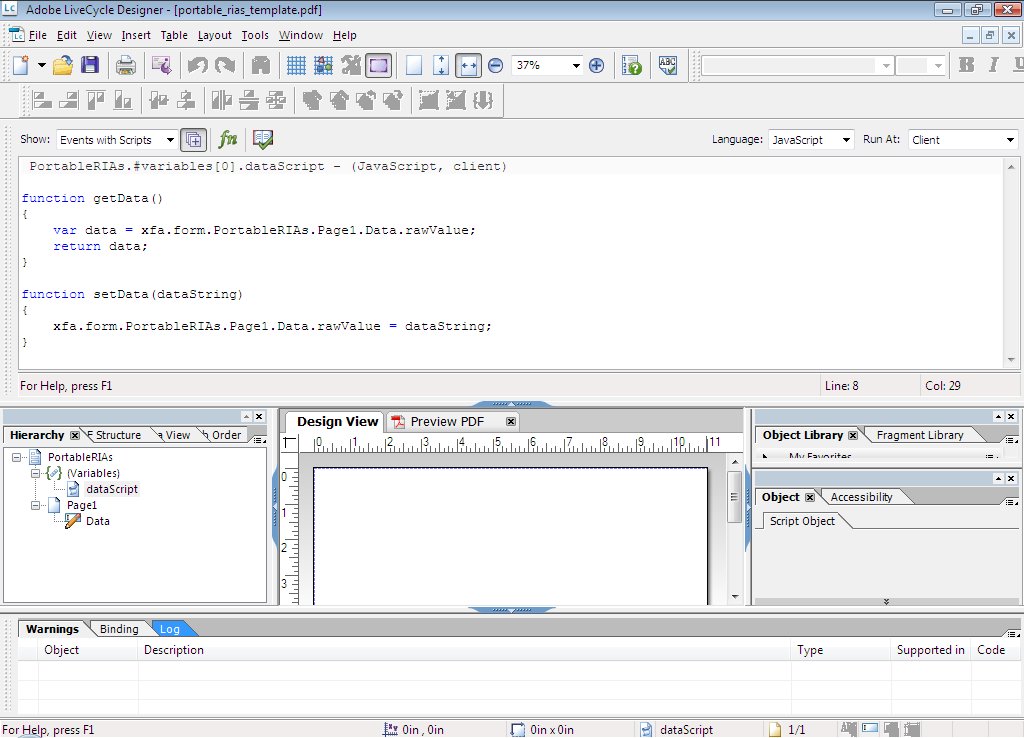
In step 7 you will merge the Flex application into this file using Acrobat.
Step 5: Modifying the Flex application to read data from the PDF
When your Flex application runs in the browser you want it to get the live data from the web. When it runs in a PDF you want it to use the data inside the PDF. This allows the application to work when the user is disconnected. For bonus points I also added the ability for users to refresh the data in the PDF when they want to. To manage this I created a class called “com.jamesward.portablerias.PDFCacheManager” containing the following code:
package com.jamesward.portablerias
{
import flash.external.ExternalInterface;
import flash.xml.XMLDocument;
import flash.xml.XMLNode;
import flash.events.EventDispatcher;

import mx.core.Application;
import mx.rpc.AsyncToken;
import mx.rpc.events.FaultEvent;
import mx.rpc.events.ResultEvent;
import mx.rpc.http.HTTPService;
import mx.rpc.xml.SimpleXMLDecoder;
import mx.utils.ObjectUtil;

[Event(name="fault", type="mx.rpc.events.FaultEvent")]

public class PDFCacheManager extends EventDispatcher
{

  private var srv:HTTPService;
  private var readerVersion:Number;

  [Bindable]
  public var inPDF:Boolean = false;

  [Bindable]
  public var lastResult:Object;

  [Bindable]
  public var lastXMLResult:String;

  [Bindable]
  public var inBrowser:Boolean = false;

  public function PDFCacheManager()
  {
    super();

    srv = new HTTPService();
    srv.useProxy = false;
    // force the result to be text
    srv.resultFormat = HTTPService.RESULT_FORMAT_TEXT;
    srv.addEventListener(ResultEvent.RESULT, handleResult);
    srv.addEventListener(FaultEvent.FAULT, handleFault);

    try
    {
      ExternalInterface.call("eval", "function getViewerVersion() { return app.viewerVersion }");
      var r:Object = ExternalInterface.call("getViewerVersion");
      if (r != null)
      {
        readerVersion = new Number(r);
      }

      if (readerVersion > 0)
      {
        inPDF = true;
      }

      if (readerVersion < 9)
      {
        // Alert.show("You must use Adobe Acrobat 9 or Adobe Reader 9 to view this PDF");
      }
    }
    catch (e:Error)
    {
      // not in a PDF
    }

    if (readerVersion >= 9)
    {
      // setup function to get the data from the PDF
      ExternalInterface.call("eval", "function getData() { return xfa.form.PortableRIAs.dataScript.getData(); }");

      // setup function to set the data in the PDF
      ExternalInterface.call("eval", "function setData(dataString) { xfa.form.PortableRIAs.dataScript.setData(dataString); }");

      // see if the PDF has been opened in the browser or in Reader
      ExternalInterface.call("eval", "function getExternal() { return this.external; }");
      inBrowser = ExternalInterface.call("getExternal");
    }

  }

  public function set url(_url:String):void
  {
    srv.url = _url;
  }

  private function handleResult(event:ResultEvent):void
  {
    parseData(event.result as String);

    if (inPDF)
	  {
	    updateCache();
	  }
  }

  private function parseData(dataString:String):void
  {
    lastXMLResult = dataString;

	  var xn:XMLNode = XMLNode(new XMLDocument(lastXMLResult));
	  lastResult = (new SimpleXMLDecoder(true)).decodeXML(xn);
  }

  private function handleFault(event:FaultEvent):void
  {
    dispatchEvent(event);
  }

  public function getDataFromServer():void
  {
    srv.send();
  }

  public function getDataFromCache():void
  {
    var xmlDataString:String = ExternalInterface.call("getData");

	  parseData(xmlDataString);
  }

  private function updateCache():void
  {
    ExternalInterface.call("setData", lastXMLResult);
  }

}
}
When this class is instantiated it checks to see if the application is running inside a PDF Reader. It also checks to make sure it’s at least Reader 9. If it is running in Reader >= 9 then it sets up a few function calls that will be used to read and write data to the hidden form field. The class stores a copy of the XML text it retrieves from the server so that when the PDF is created in the browser, it doesn’t have to retrieve the data again. Also if the user updates the data while in the PDF then the local form field is updated but the user would need to save the PDF for the data to be persisted for the next time the PDF is opened.
To use the PDFCacheManager class simply create an instance of it and specify the id, url, and optionally a fault handler:
<portablerias:PDFCacheManager id="pdfCacheManager" url="http://ws.jamesward.com/data.php" fault="mx.controls.Alert.show(event.fault.message)"/>
When the Flex application has fully initialized I ask the PDFCacheManager to get the data either from within the PDF if the application is running inside Reader or from the network if the application is running in the browser:
<mx:applicationComplete>
  if (pdfCacheManager.inPDF)
  {
    pdfCacheManager.getDataFromCache();
  }
  else
  {
    pdfCacheManager.getDataFromServer();
  }
</mx:applicationComplete>
In the Dashboard you can now bind to the data in the pdfCacheManager:
<local:Dashboard width="100%" height="100%" dataProvider="{pdfCacheManager.lastResult.list.month as mx.collections.ArrayCollection}"/>
Now your Flex application will display data whether it is running on the web or inside a PDF!
Step 6: Adding a way for the user to generate a PDF from the Flex application
Next you’ll want to modify the Flex application so that a user can initiate the PDF generation. To do this I created a simple ActionScript class called “com.jamesward.portablerias.CreatePDFService” which will pass the data in the Flex application to the back-end PDFService. Here is the code for that class:
package com.jamesward.portablerias
{
  import flash.net.URLRequest;
  import flash.net.navigateToURL;

  import mx.rpc.events.FaultEvent;
  import mx.rpc.events.ResultEvent;
  import mx.rpc.remoting.RemoteObject;

  public class CreatePDFService
  {
    private var ro:RemoteObject;

    public function CreatePDFService()
    {
      ro = new RemoteObject("PDFService");
      ro.addEventListener(ResultEvent.RESULT, handleResult);
    }

    public function generatePDF(xmlString:String):void
    {
      var xmlData:XML = <PortableRIAs><Data>{xmlString}</Data></PortableRIAs>;

      ro.generatePDF(xmlData);
    }

    private function handleResult(event:ResultEvent):void
    {
      var url:String = event.result as String;
      navigateToURL(new URLRequest(url), "_blank");
    }

  }
}
When the PDFService is called it is passed an XML block containing the XML data that the Flex application loaded from the server. Although you could use alternative serialization methods instead of XML, for simplicity this demo uses XML. Notice that the data is wrapped in the
When the result is returned by the server the client opens a new browser window pointing to the download servlet that initiates the PDF download.
To use this class in the main Flex application simply create an instance of the CreatePDFService:
<portablerias:CreatePDFService id="createPDFService"/>
Then add a button for the user to click to initiate the PDF generation:
<mx:Button label="Create PDF" visible="{!pdfCacheManager.inPDF}" includeInLayout="{!pdfCacheManager.inPDF}">
    <mx:click>
      createPDFService.generatePDF(pdfCacheManager.lastXMLResult);
    </mx:click>
</mx:Button>
Notice that the data passed to the generatePDF method is pulled out of the pdfCacheManager that was created in the previous step. Also the button is only made visible when the Flex application is not running inside a PDF.
Step 7: Merging the final Flex application into the PDF template
Hopefully your Flex application compiles and is working in the browser. The final step is to update the PDF template and include the Flex application into it. It would be nice to automate this step somehow but at this time I’m not aware of a method for doing this. Also one thing to note is that you are using the same application for the browser and for the PDF. You can create different applications if you want to and still use much of the same code. But for this demo using the same Flex application for both mediums works fine.
First open the PDF template in Acrobat, then choose Tools > Multimedia > Flash Tool. Drag a box that will contain the Flex application (you’ll resize it later). Browse and select the SWF file for your Flex application. Select “Show Advanced Options” and set the “Enabled When” option to “When the page containing the content is opened”. Click OK. To resize the Flex application choose Tools > Advanced Editing > Select Object Tool. Then select the image of the Flex application and resize it. The PDF should look like the following:

Save the PDF to the file location specified in the PDFService Java class. In my case this is “WEB-INF/pdfgen/dashboard.pdf”.
Everything should now be ready to go! Pull up your Flex application in the browser, click the “Create PDF” button, and then you should be looking at the Flex application with its data inside of a PDF! If the PDF opened in your browser you can save it to your local file system and load it in the standalone Reader. Also make sure that clicking the “Update Data” button works to refresh the data from the server.