Flex Example: Right-Click -> Save Image As

One of the things that is available in HTML web pages but usually left out of Flex applications is the ability to save images by right-clicking on them. This is not because it’s not possible with Flex – rather it just requires a little extra coding. So I created a simple Flex example that adds the “Save Image As” right-click menu item. Check out the demo and the source code.
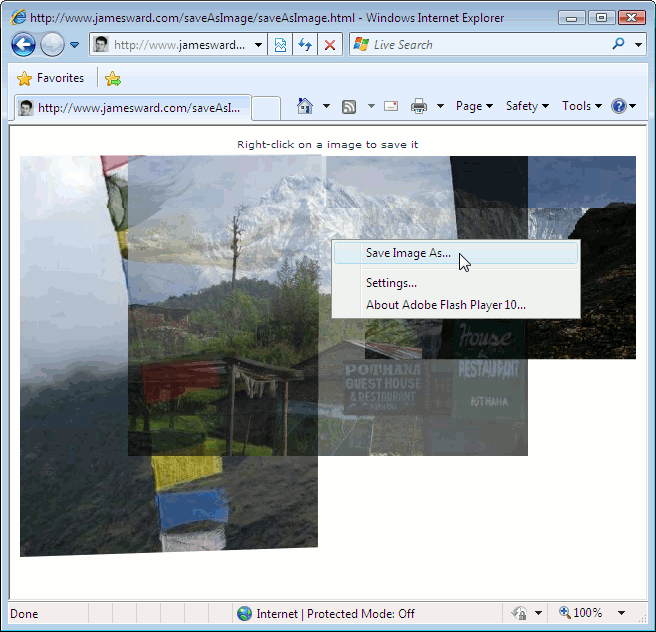
Flex Example - Save Image As

This requires Flash Player 10 which allows users to save files generated at runtime on the client-side. I couldn’t find the ByteArray containing the original image file loaded by Flash Player so instead I had to read the bytes of the image wrapped in a SWF and slice out the image. I’m not 100% sure that this trick will work for all image formats. So give it a try and let me know what happens.

This entry was posted in Flex. Bookmark the permalink. Post a comment or leave a trackback: Trackback URL.

8 Comments

  1. dmendels
    Posted July 9, 2009 at 10:42 am | Permalink

    Nice! I wanted this feature for years (it still should be a default option but I am glad it can be done) :)

  2. Posted July 9, 2009 at 12:35 pm | Permalink

    Thank you James, nice work. I found it helpful.

  3. nae2
    Posted July 9, 2009 at 12:45 pm | Permalink

    > content.loaderInfo.bytes.readBytes(tba, 0, (content.loaderInfo.bytes.length – 17));
    > tba.position = 49;

    Can you explain why you’re substracting 17 from image bytes length and set position to 49 in saveImageAs function?

  4. Posted July 9, 2009 at 12:52 pm | Permalink

    Hi nae2,

    The contents of content.loaderInfo.bytes isn’t the image but rather the image embedded in a SWF. So I’m pulling the image out of the SWF by chopping off the first 49 bytes and then the last 17 bytes. I have no idea what’s in those bytes or if it’s always 49 and 17. So this needs some testing.

    Alternatively there are a few other ways to do this:
    – Re-fetch the image from the server
    – Maybe find some place in memory where the non-SWF-ified image is and use those bytes
    – Re-encode the image on the client

    I opted to mess with the bytes instead of those options. But maybe someone smarter than me can find a cleaner way to do this.

    -James

  5. nae2
    Posted July 9, 2009 at 2:02 pm | Permalink

    Thanks for quick response. Mostly in my apps I use 1st and 3rd option: fetch it again from server or re-encode the image with PNGEncoder.
    I’ve never saw or used this hack, but i’ts good to know that such thing exists :)

  6. Nehul
    Posted July 13, 2009 at 4:48 pm | Permalink

    I have re-encode the image on client here is the source

    ===========================
    var bmp:Bitmap = Bitmap(this.content);
    var myEncoder:JPGEncoder = new JPGEncoder(75);
    var byte:ByteArray = myEncoder.encode(bmp.bitmapData);
    var fr:FileReference = new FileReference();
    fr.save(byte, “test.jpg”);
    =========================

    You have add this in saveImageAs function in source file SaveableImage.cs in Jamesward packge.

    You need two additional file JPGEncodeer.as and BitString.as for conversion on client side. I can’t attach them on blog.

  7. Nehul
    Posted July 13, 2009 at 5:11 pm | Permalink

    one more thing in your MXML do this

    <custom:SavableImage id="saveImage" name="” >

    in above code filename will be image name coming from server. I have file name set in database column and actual file on server. So it was pretty easy to replace filename to {javadto.imagefilename}

    Now in actionscript

    ===========================
    var bmp:Bitmap = Bitmap(this.content);
    var myEncoder:JPGEncoder = new JPGEncoder(75);
    var byte:ByteArray = myEncoder.encode(bmp.bitmapData);
    var fr:FileReference = new FileReference();
    fr.save(byte, this.name);
    =========================

    save dialog will have same file name as source.

  8. Miha Blazin
    Posted July 14, 2009 at 1:39 am | Permalink

    I think your sample is great and a thing that constantly gets forgotten when building RIAs with Flex. I do agree the Flex components should provide this functionality (if not by default then at least as a property to set). I do find it weird although, why Acrobat.com Buzzword application ignores the right click context menu features and instead shows a new button everytime you select some text, which makes it really unnaturaly to work with a Rich Text Editor (at least in the traditional way). Is that perhaps because the right click is (or will be) a problem on some platforms that support (or will support) the Adobe Flash Platofrm – like Mobile devices.

One Trackback

  1. [...] check out the original implementation by James Ward… it might suite your needs better… http://www.jamesward.com/blog/2009/07/09/flex-example-right-click-save-image-as/ leave a comment « EverythingFlex now on [...]

Post a Comment

Your email is never published nor shared. Required fields are marked *

*
*

You may use these HTML tags and attributes: <a href="" title=""> <abbr title=""> <acronym title=""> <b> <blockquote cite=""> <cite> <code> <del datetime=""> <em> <i> <q cite=""> <strike> <strong> <pre lang="" line="" escaped="">

Subscribe without commenting

  • About James Ward


    View James Ward's profile on LinkedIn

  • First Steps in Flex by James Ward and Bruce Eckel


  • Twitter Updates


  • Tour de Flex